• Welcome to the Muppet Central Forum!
    You are viewing our forum as a guest. Join our free community to post topics and start private conversations. Please contact us if you need help.
  • The Muppet Show
    The must-see event of the year is here! Let us know your review of The Muppet Show special starring Sabrina Carpenter now streaming on Disney+.
  • Sesame Street Classics on YouTube
    Full episodes of classic Sesame Street have arrived on YouTube. See the latest releases and join the discussion.
  • Sesame Street debuts on Netflix
    Sesame Street Season 56 has premiered on Netflix and PBS. Let us know your thoughts on the anticipated season.
  • Back to the Rock Season 2
    Fraggle Rock Back to the Rock Season 2 has premiered on AppleTV+. Watch the anticipated new season and let us know your thoughts.
  • Sam and Friends Book
    Read our review of the long-awaited book, "Sam and Friends - The Story of Jim Henson's First Television Show" by Muppet Historian Craig Shemin.
  • Jim Henson Idea Man
    Remember the life. Honor the legacy. Inspire your soul. The new Jim Henson documentary "Idea Man" is now streaming exclusively on Disney+.
  • Bear arrives on Disney+
    The beloved series has been off the air for the past 15 years. Now all four seasons are finally available for a whole new generation.

How to start a new thread

MuppetsRule

Well-Known Member
Joined
Dec 2, 2002
Messages
1,611
Reaction score
1,765
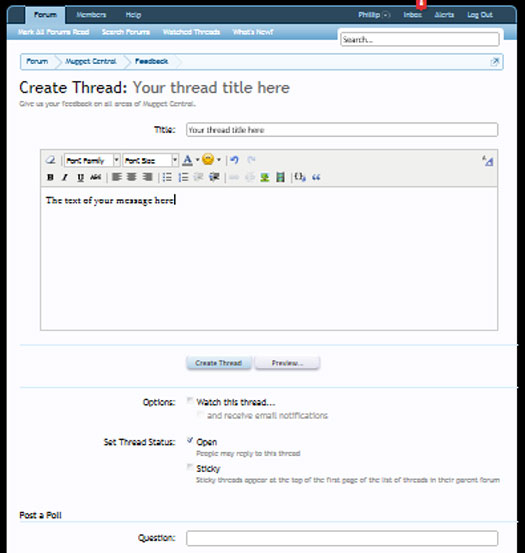
Can somebody tell me how to start a new thread? I have an article I would like to post. When I start a new thread there is no message box just an area for a poll.

 

Muppet fan 123

Well-Known Member
Joined
Jun 16, 2011
Messages
3,656
Reaction score
1,488
Can somebody tell me how to start a new thread? I have an article I would like to post. When I start a new thread there is no message box just an area for a poll.

You go to the top of the page and click "POST NEW THREAD"
But this doesn't work if you're on "What's New"
 

MuppetsRule

Well-Known Member
Joined
Dec 2, 2002
Messages
1,611
Reaction score
1,765
I click on the Post New thread button in blue
I get a box to enter the title and then some selections to post a poll but nowhere to enter an actual message. I don't want to start a poll, I want to start a new thread.
 

Phillip

Administrator
Staff member
Joined
Apr 11, 2002
Messages
8,447
Reaction score
3,505
Can somebody tell me how to start a new thread? I have an article I would like to post. When I start a new thread there is no message box just an area for a poll.
Are you seeing this after you start a new thread? If not, please let us know what browser and version number you are using.


MuppetsRule

Well-Known Member
Joined
Dec 2, 2002
Messages
1,611
Reaction score
1,765
I am using Firefox 9.0 No I am not seeing that. I am seeing a place to start a poll
 

MuppetsRule

Well-Known Member
Joined
Dec 2, 2002
Messages
1,611
Reaction score
1,765
Oh, and I can't start a conversation with somebody either.
I get a place for participants and a place for the title but no place to put a message. If I click on start a conversation I get an error message that states:

Please enter a valid message.
 

MuppetsRule

Well-Known Member
Joined
Dec 2, 2002
Messages
1,611
Reaction score
1,765
I downloaded Explorer 8 and can post new threads from that but not from Firefox 9.0
 

Phillip

Administrator
Staff member
Joined
Apr 11, 2002
Messages
8,447
Reaction score
3,505
After doing some research this is an issue with the Firefox 9 beta and how it handles the post editor.

For you or anyone using the Firefox 9 beta, this will be corrected here in the near future when our forum software is updated. I'll announce the rollout of the update before it happens in our "Announcements" forum.

In the meantime, some Firefox 9 users have experienced success by refreshing the create a thread posting page multiple times and the text box should properly appear.
 

Muppet fan 123

Well-Known Member
Joined
Jun 16, 2011
Messages
3,656
Reaction score
1,488
After doing some research this is an issue with the Firefox 9 beta and how it handles the post editor.

For you or anyone using the Firefox 9 beta, this will be corrected here in the near future when our forum software is updated. I'll announce the rollout of the update before it happens in our "Announcements" forum.

In the meantime, some Firefox 9 users have experienced success by refreshing the create a thread posting page multiple times and the text box should properly appear.
How do you post a picture on a post?
I tried but it always asks me for a URL of the picture, and my pictures that I want to post are on my computer and when I try that it doesn't work
 

Sgt Floyd

Well-Known Member
Joined
Feb 5, 2006
Messages
27,870
Reaction score
2,540
How do you post a picture on a post?
I tried but it always asks me for a URL of the picture, and my pictures that I want to post are on my computer and when I try that it doesn't work
A bit late, but it you have not figured it out yet you need to upload the picture to an image host like photobucket or imageshack. Then use the direct url
 
Top